AI Agent vs Chatbot: What's the Difference and Which One You Need
The short answer
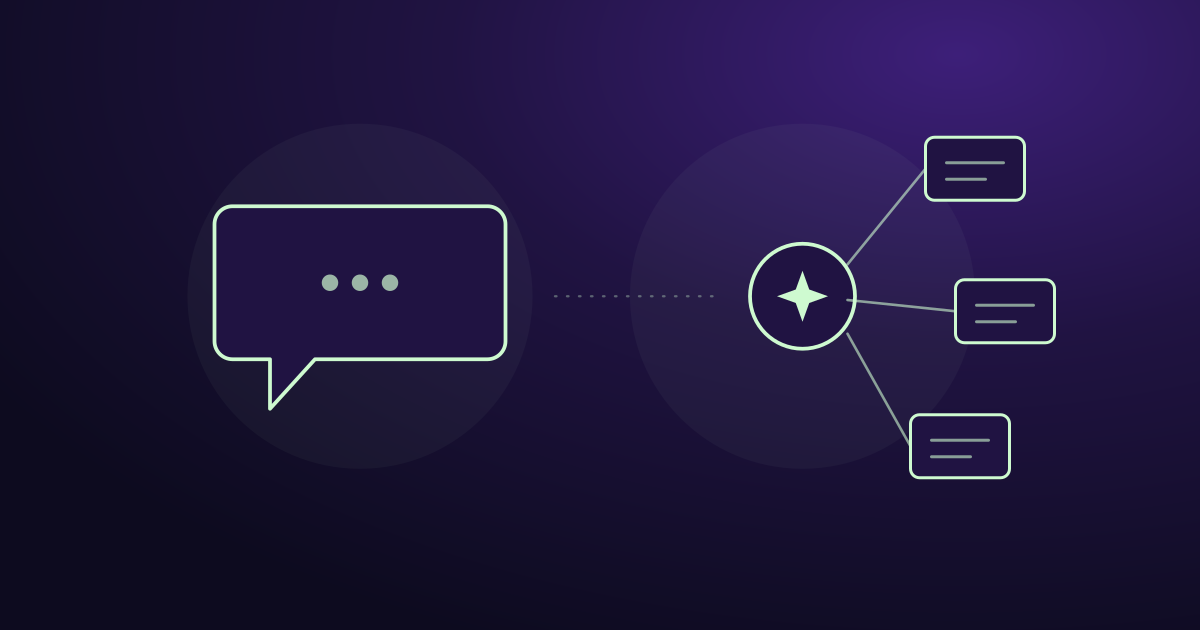
A chatbot answers questions. An AI agent does work.
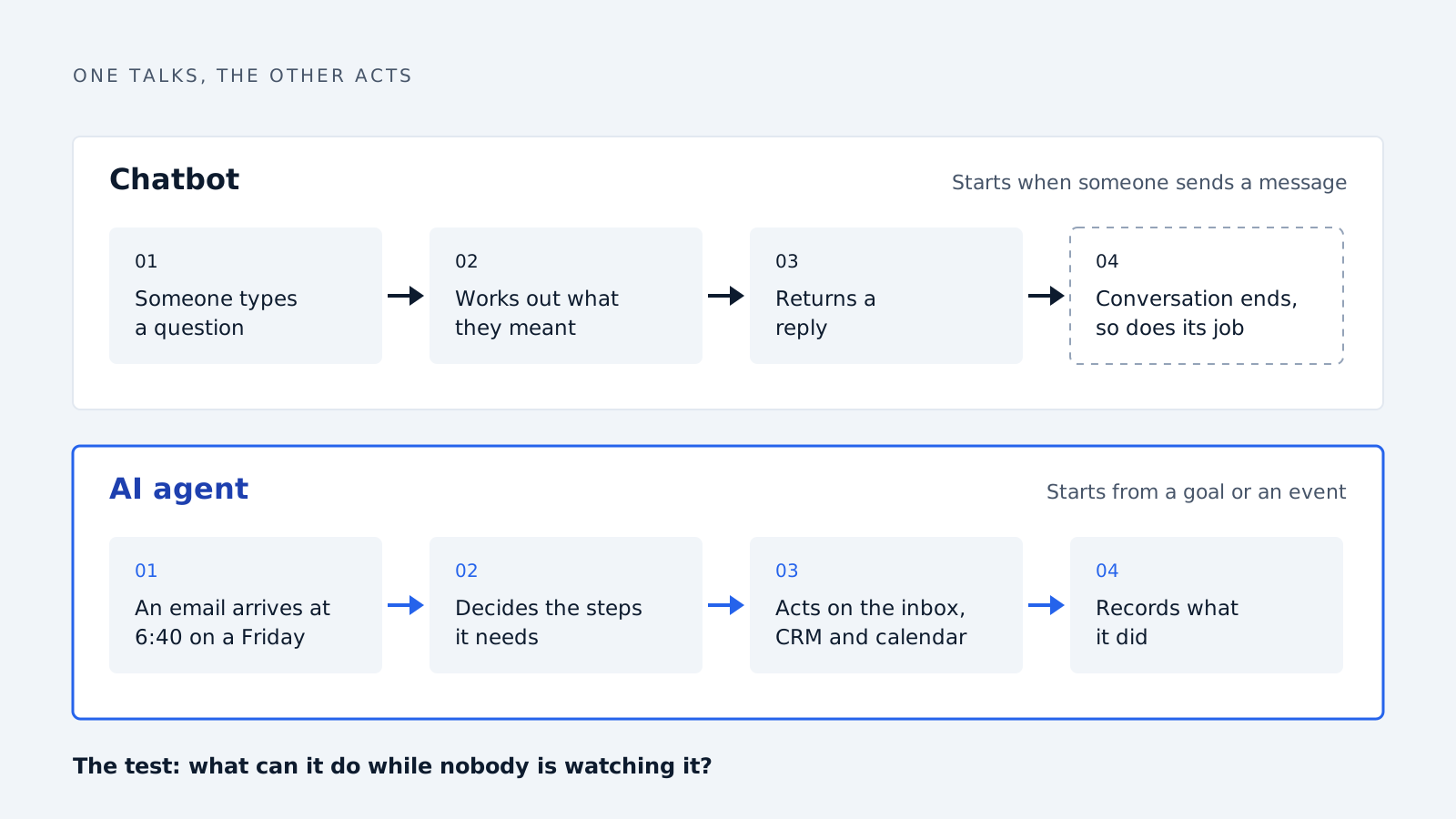
That’s the whole difference in one line. A chatbot takes a message and returns a reply. An AI agent takes a goal, decides what steps it needs, uses your actual systems to carry them out, and reports back. One talks. The other acts.
Everything below is detail on that distinction. What each one is good at. When a chatbot is the smarter purchase. And how to work out which one a vendor is really selling you.
What a chatbot actually does
A chatbot sits in one place, usually a widget on your website, and handles a conversation. Someone types a question. It works out what they meant and returns an answer.
Modern ones are good at this. An LLM-backed chatbot trained on your documentation can answer product questions, handle pricing queries and qualify a visitor with a few questions. It doesn’t need scripted decision trees any more. It understands phrasing it has never seen.
What defines a chatbot isn’t how clever the language model is. It’s the boundary of what it touches. A chatbot operates inside the conversation. It reads, it replies, and when the conversation ends, so does its job. It might write the transcript to your CRM afterwards, but that’s a handoff, not an action it decided to take.
Three things follow from that boundary:
-
It waits. A chatbot does nothing until someone starts talking to it. No visitor, no activity.
-
It lives in one channel. The widget on your site, or the window in your help centre. It doesn’t see your inbox.
-
It has no stake in the outcome. It answers the question in front of it. Whether that visitor becomes a customer is somebody else’s problem.
None of this is criticism. For a lot of jobs it’s exactly right, and the section further down says which ones.
What an AI agent actually does
An AI agent starts from a goal instead of a message. “Make sure no real inquiry waits more than ten minutes.” Nobody has to talk to it for it to start working.
Four capabilities separate it from a chatbot.
It acts on your systems. An agent has connections to your inbox, your CRM, your calendar. It can read an email, write a record, send a notification. A chatbot can describe your refund policy. An agent can process the refund.
It decides the steps. You give it an outcome, not a script. Faced with a new email, it works out whether this is a lead, whether the sender looks legitimate, who should see it and how urgently. Those are decisions, not branches someone drew in advance.
It keeps state. An agent remembers that this sender emailed three weeks ago, that the thread is already assigned, that the last reply went unanswered. Chatbots mostly forget between conversations. For an agent, the history is the point.
It runs without being triggered by a person. Email arrives at 6:40 on a Friday evening. The agent reads it, scores it, routes it. Nobody was watching.
That last one is the practical difference most buyers feel first. A chatbot captures the people who come to your website during the conversation they chose to start. An agent handles everything arriving through every channel, including the hours nobody is working.
AI agents vs chatbots, side by side
| Chatbot | AI agent | |
|---|---|---|
| Starts when | Someone sends a message | A goal is set, or an event happens |
| Works in | One channel, usually a web widget | Your inbox, CRM, calendar, whatever it’s connected to |
| Output | A reply | An action, plus a record of it |
| Memory | Usually the current conversation | History across contacts and threads |
| Decides | Which answer fits the question | Which steps the goal needs |
| Runs overnight | No | Yes |
| Fails by | Giving a wrong answer | Taking a wrong action |
| Setup | Point it at your docs, publish the widget | Connect systems, set permissions, define escalation |
| Oversight needed | Review transcripts occasionally | Approval rules, logging, a human for edge cases |
The last three rows are where buyers get surprised. An agent is more capable, and the failure mode scales with the capability. A chatbot that gets something wrong has said something wrong. An agent that gets something wrong has done something wrong, in a system of record, possibly to a customer. That’s why any agent worth buying sends nothing externally without an approval step.
When a chatbot is the better choice
Most articles on this comparison are published by companies that sell agents, so they tend to treat the chatbot as the thing you’ve outgrown. That’s not honest. In four situations a chatbot is the better purchase, and buying an agent instead wastes money and months.
Your questions are repetitive and your answers are fixed. Opening hours, shipping times, return policy, specifications. If the job is retrieving the right answer from material you already have, that’s a chatbot. An agent adds cost and risk for no benefit.
All the demand arrives in one place. If your inquiries come through a website form and nowhere else, a widget covers it. Agents earn their cost by working across channels. With one channel there’s nothing to coordinate.
Volume is low. Under roughly twenty inquiries a week, a person can handle the inbox and nothing is slipping. Automating that solves a problem you don’t have. Revisit it when volume climbs or someone takes leave.
You can’t let software act unsupervised yet. Regulated industries, legal exposure, or an internal policy that every customer-facing message gets human sign-off. An agent that can’t act is an expensive chatbot. Start with the chatbot, add the agent when the approval process is ready.
A blunter version: if you cannot name a specific action you want taken without a human, you want a chatbot. “Answer questions faster” is a chatbot requirement. “Nothing should sit unanswered overnight” is an agent requirement.
When you actually need an agent
The case for an agent is strong when work is being lost between systems rather than inside conversations.
Inquiries arrive in a shared inbox. sales@ or info@ is where deals quietly die. Nobody owns it, everyone assumes someone else looked, and the message that mattered sits under forty newsletters. A chatbot can’t help here because the customer never visited your site. They emailed.
Response time is costing you deals. Most B2B teams measure first response in hours or days, while buyers compare two or three vendors at once and often go with whoever replies first. If you lose on speed rather than on price or product, that’s an agent problem.
The work needs several systems. Read the email, check whether this company is already in the CRM, score the intent, notify the right rep, create the record. A chatbot touches none of that.
Volume has outgrown attention. Past roughly fifty inbound messages a week, triage stops being reliable. Not because anyone is careless, but because sorting is boring and people batch it until the end of the day.
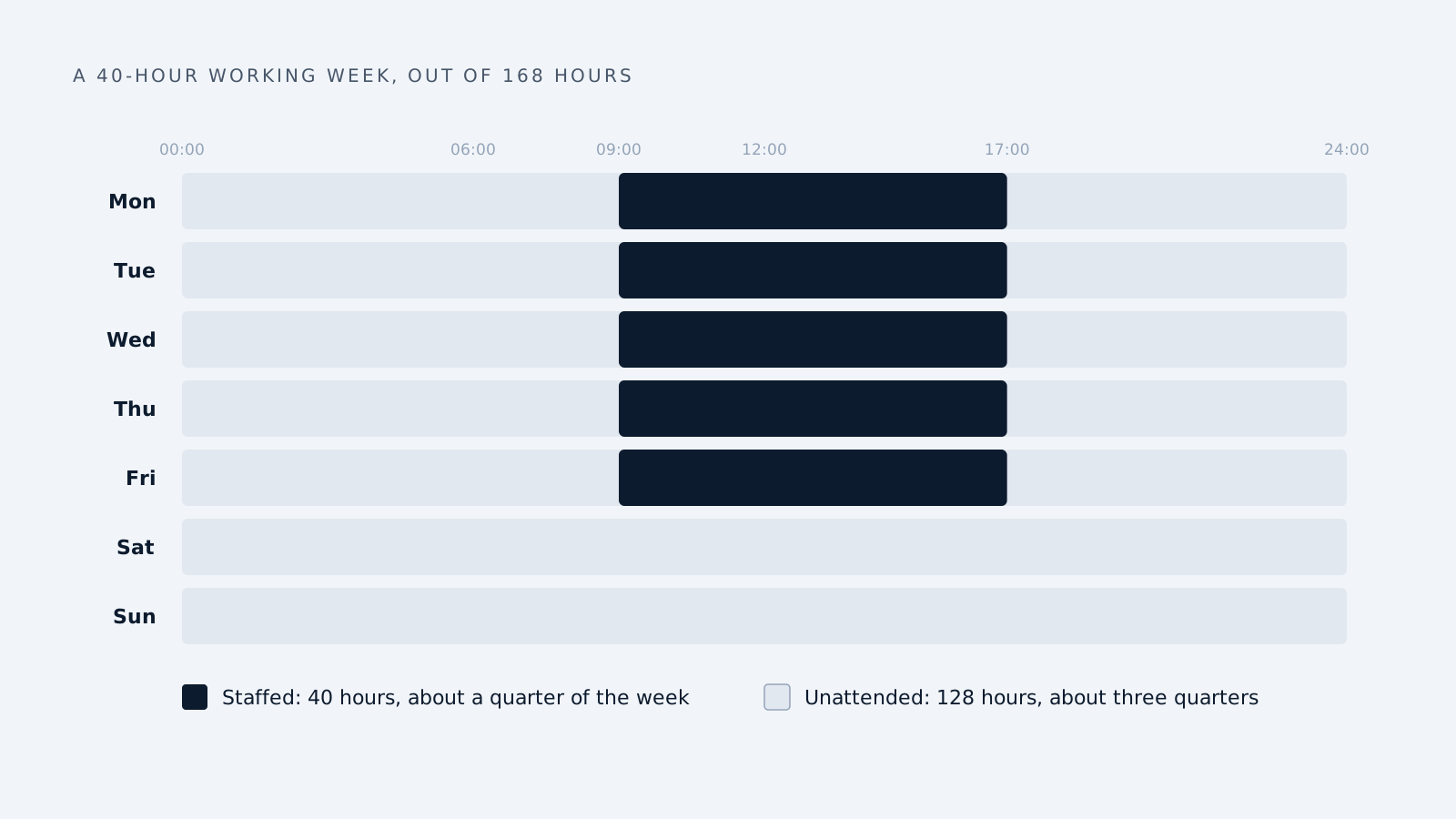
Nobody is on duty for most of the week. A European working week is about 40 hours out of 168. Three quarters of the time, your inbox is unattended. An agent closes that gap.
The common thread: the problem isn’t answering well. It’s that the thing arrived and nobody did anything with it in time.
Where the line blurs
The two categories are converging, and vendor language has stopped tracking the difference.
Chatbots have grown arms. Plenty of support widgets can now look up an order, issue a refund or book a meeting. That’s a chatbot performing actions, which by the definition above makes it partly an agent. The honest description is a conversational interface with a few tools attached. It still waits for someone to start talking.
Agents have grown faces. Most agents need a way to show you what they did and let you intervene, so they end up with a chat window. That doesn’t make them chatbots. The chat is a control panel, not the product.
Meanwhile the word “agent” is being applied to almost anything. A scheduled script is called an agent. A prompt template is called an agent. A chatbot with a database lookup is called an agentic platform. The label has been stretched until it tells you nothing about what you’re buying.
One question cuts through all of it: what can this thing do while nobody is watching it?
If the answer is nothing, it’s a chatbot, whatever the website says. If it can take a meaningful action on its own, in a system that matters, it’s an agent. Then you should be asking about permissions, logging and approval rules.
How to tell what a vendor is really selling
Seven questions. Ask them on the demo and the category becomes obvious regardless of the marketing.
-
What does it do when nobody is logged in? The single clearest test. A chatbot idles. An agent works.
-
Which systems can it write to, not just read? Read-only access means it reports. Write access means it acts.
-
Show me something it did that nobody asked it to do. An agent has examples. A chatbot has transcripts.
-
What happens when it isn’t sure? You want a named escalation path, not a confident guess.
-
Can it send anything externally without a human approving it? If yes, ask how you turn that off. Every serious deployment starts with approval on.
-
Where is the log of what it did? Actions without an audit trail are a liability, especially under GDPR.
-
Which model provider processes our data, and where? Fair question for either category, and the answer is often vague. Push until it isn’t.
Questions two, five and six separate products that are genuinely ready from products that are a demo with a roadmap behind it.
Frequently asked questions
What is the difference between an AI agent and a chatbot? A chatbot answers questions inside a conversation. An AI agent pursues a goal across your systems, deciding its own steps and taking actions such as updating a CRM or routing an email. The simplest test is what each does when nobody is talking to it. A chatbot waits. An agent keeps working.
Is ChatGPT an agent or a chatbot? The basic chat interface is a chatbot. It responds to what you type and does nothing in between. When it’s given tools and allowed to browse, run code or act on connected apps, it starts behaving as an agent. The underlying model is the same, so the capability depends on what it’s connected to.
Are AI agents just chatbots with extra features? No, though marketing often blurs it. The difference is architectural, not cosmetic. An agent needs permissions, memory across sessions, a planning loop and an audit trail. Adding a database lookup to a chat widget doesn’t produce those, and vendors do describe such products as agentic anyway.
Which is cheaper, a chatbot or an AI agent? Chatbots are cheaper to buy and much cheaper to deploy, often live within days. Agents cost more and need system integration, permission design and an approval process. The comparison only makes sense against the work each removes, not against each other.
Can an AI agent replace a sales rep? No, and vendors claiming otherwise are overselling. Agents handle triage, routing, record-keeping and first response reliably. Qualification calls, negotiation and relationship work remain human. The realistic gain is reps spending time on live opportunities rather than sorting an inbox.
Do I need both a chatbot and an AI agent? Many companies run both, and they cover different ground. The chatbot handles visitors on your website who want an answer now. The agent handles everything arriving by email and other channels, including outside working hours. They overlap less than the shared category name suggests.
Is an agentic chatbot the same as an AI agent? Usually not. The term normally describes a conversational interface that can call a few tools, such as looking up an order. It still waits for a human to start the conversation. A true agent can begin work from an event or a goal with nobody present.
How do I know if my business needs an agent? If you can name a specific action that should happen without a person, you need an agent. If the requirement is answering questions faster, a chatbot will do. “Nothing should sit unanswered overnight” is an agent requirement; “explain our pricing to visitors” is not.
How we write, source and correct our articles:editorial policy.
Related reading
AI Agents vs Automation: What's the Difference and When Each One Wins
Automation follows rules you wrote. An AI agent makes judgement calls you couldn't write rules for. Here's the difference, where RPA fits, and which one your process needs.
BI as a Service (BIaaS): What It Is, Who It's For, and How to Choose a Provider
BI as a service means an outside provider runs your reporting on a subscription. What it costs, who should skip it, and seven questions to ask a provider.
AI for Freight Brokers: Where It Wins Loads, and Where It Doesn't
Big brokers answer email quotes with AI in two minutes. What a small brokerage can automate today, where AI catches freight fraud, and what to keep human.
Ready when you are
See it read your own sales mailbox
Twenty minutes, on a real mailbox, with no slides. Gmail, Google Workspace, Outlook and Microsoft 365.