BI as a Service (BIaaS): What It Is, Who It's For, and How to Choose a Provider
What BI as a Service actually is
BI as a service (BIaaS) means an outside provider runs your whole business intelligence function on a subscription. They handle data integration, modeling, dashboards, reporting and maintenance. You pay a monthly fee and get working reports. You don’t buy tools or hire a team to operate them.
The distinction that matters isn’t cloud versus on-premise. Almost every BI tool is cloud-hosted now. A cloud license for Power BI or Tableau is still software you have to run yourself.
BIaaS is an outsourcing model, not a hosting model. What you’re buying is the people. The analysts who build the models. The engineers who keep pipelines running. And someone who answers for it when a number is wrong on a Monday morning.
That’s why the term confuses people. Vendors use it for three different things: hosted BI software, a managed analytics service, and a consultancy retainer with dashboards attached. This article separates them, because the contract you sign depends on which one you’re actually buying.
How a BIaaS engagement works
A real BIaaS provider owns four layers. The boundary between what they own and what you own is the whole contract.
Data integration. The provider connects your source systems: ERP, CRM, finance, e-commerce, operational databases. They keep those connections working when a vendor changes an API or someone renames a field. This layer quietly eats most of the budget, and buyers miss it more than any other.
Modeling and warehouse. Raw tables become a semantic model. That means written definitions of what counts as a customer, when revenue is recognized, which orders count as shipped. The provider usually builds this on a cloud warehouse they manage. You should still own the definitions, in writing. They encode how your business measures itself.
Visualization and delivery. Dashboards, scheduled reports, alerts. Often built on a commercial platform the provider licenses for you. That’s where the “as a service” economics come from, since their license cost is spread across clients.
Ongoing operation. Pipeline monitoring, failure recovery, new report requests, and analyst hours for questions the dashboards don’t cover. This is what separates BIaaS from a one-off build project.
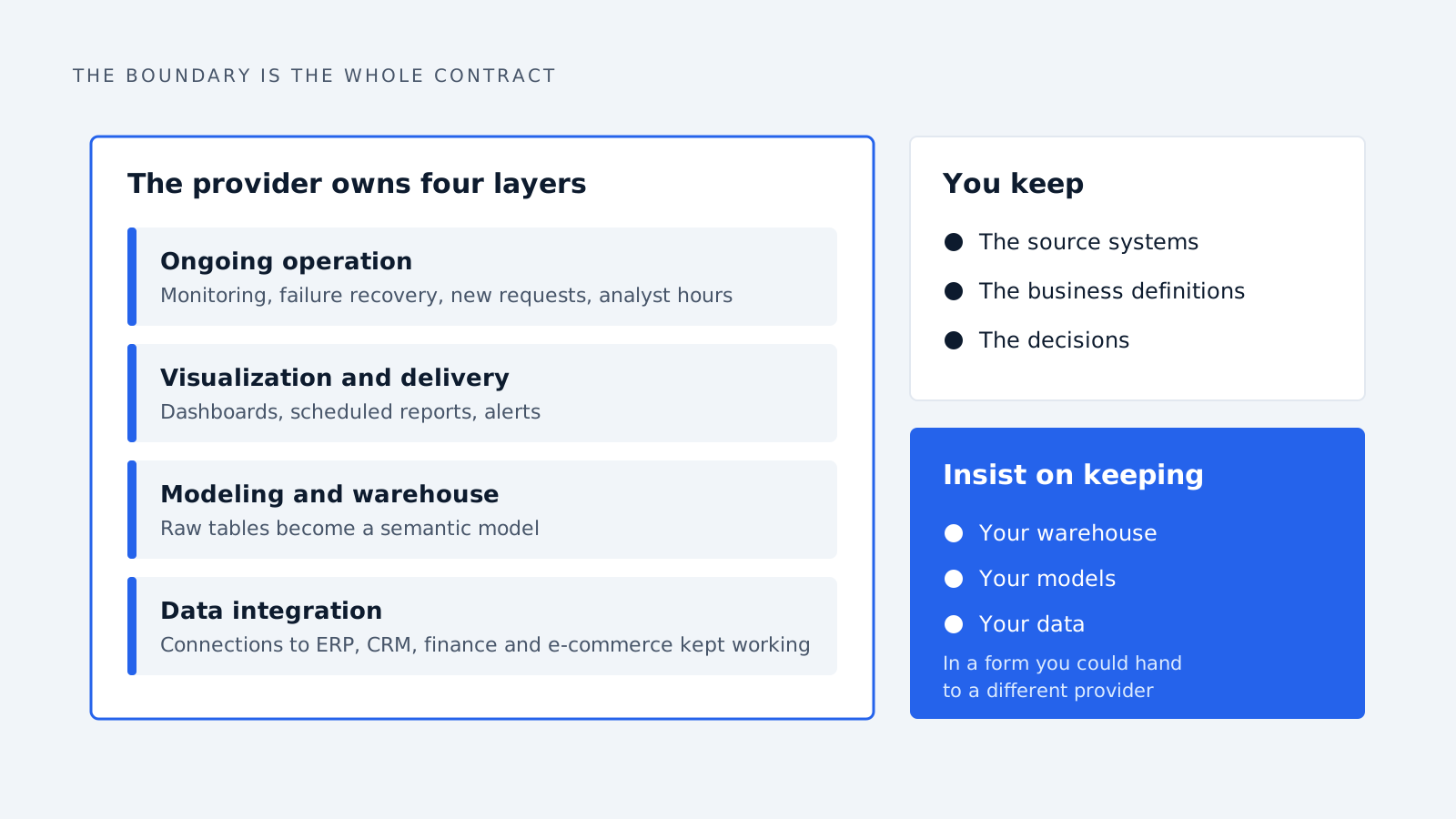
You keep the source systems, the business definitions and the decisions. You should also insist on keeping your warehouse, your models and your data in a form you could hand to a different provider. A BIaaS contract where the models live inside the provider’s proprietary layer isn’t a service. It’s a hostage arrangement.
BIaaS compared with the alternatives
Five models get sold under overlapping language. They differ on who operates the thing, how fast it goes live, and what happens when you want to leave.
| Model | Who operates it | Time to first useful report | Typical annual cost | Leaving costs you |
|---|---|---|---|---|
| BI as a service | Provider | 4-10 weeks | Subscription, mid five figures and up | Models and pipelines, unless contracted otherwise |
| In-house BI team | You | 6-18 months | Two or more salaries plus licenses | Nothing, but hiring is the bottleneck |
| Self-serve BI tool | You | Days to set up, months to be useful | Per-seat licenses | Little. The tool is portable |
| Data warehouse as a service | Provider (storage only) | Weeks | Consumption-based | Little. Standard SQL |
| Embedded BI | Your product team | Months | Platform OEM fee | Significant rework |
People get one comparison wrong more than any other: BIaaS versus a self-serve tool. Buying Power BI isn’t an alternative to BIaaS. It’s a component of it. Companies that think they chose between the two have usually bought licenses, then found they still need someone to build the model underneath. That’s the expensive part.
The real competitor to BIaaS is a data warehouse as a service plus one internal analyst. That combination costs less and keeps the capability in-house. It works well when your data sits in a small number of clean systems. It fails when integration is the hard part, and that’s where a provider with existing connectors earns the premium.
Who it fits, and who shouldn’t buy it
BIaaS fits when three things are true at once. Reporting is already a bottleneck. Your data lives in more than three systems. And you can’t hire a data engineer in the next six months.
Mid-market manufacturers, distributors and multi-site service firms land here often. So do PE-owned groups pulling reporting together across portfolio companies.
It also works when you need the capability temporarily: a post-acquisition integration, a refinancing that needs board-grade reporting, a year of growth before an internal hire makes sense.
Don’t buy BIaaS if:
-
Your data sits in one system that already reports well. Paying for a service layer over a single clean source buys integration you don’t need.
-
You can’t name the ten questions you want answered. A provider will happily build fifty dashboards nobody opens, and you’ll have paid for all of them.
-
Analytics is part of what you sell. Outsourcing the thing you compete on rarely ends well.
-
The real problem is data quality in the source systems. BIaaS makes bad data visible faster. It doesn’t fix it.
That last point deserves weight. It’s the most common reason these engagements disappoint. The provider is accountable for the pipeline, not for whether your sales team fills in the CRM.
What it costs
BIaaS gets priced three ways. The model tells you more about the provider than the number does.
Flat monthly retainer. A fixed fee covering a defined scope of sources, dashboards and support hours. Predictable, and the most common deal in the mid-market. Watch how scope is defined. “New report requests” is where retainers quietly turn into change orders.
Per-user subscription. Priced off seats, usually when the provider resells a platform license. Attractive at ten users, punishing at two hundred. It also sets up the wrong incentive. You end up rationing access to reports you paid to build.
Consumption-based. You pay for warehouse compute and storage plus a service layer. Honest, but hard to budget. One badly written query can produce a memorable invoice.
A rough frame: a mid-market engagement with four to six source systems, a managed warehouse and ongoing analyst support usually lands in the mid five figures per year. It climbs from there with the number of sources. Enterprise engagements run well into six figures. Treat any quote far below that range as a dashboard contractor in different packaging, or a scope that leaves out the integration work.
Costs that don’t appear on the quote: your own team’s time during discovery, which is a lot, plus source-system clean-up and the internal owner the engagement needs. A BIaaS engagement with no internal counterpart drifts within two quarters.
How to evaluate a provider
Most BIaaS pitches look identical. These questions separate a real service from a dashboard contractor on a retainer.
-
Who owns the warehouse and the models if we leave? The only good answer is that you do, in a standard format, exported on request. Read the exit clause before the demo.
-
Show me a semantic model you built for a client in our sector. Redacted is fine. You’re checking whether they model a business or just chart tables.
-
What happens at 2am when a pipeline fails? You want monitoring, alerting, an on-call arrangement and a stated recovery time. Not “we check it in the morning.”
-
How many new report requests are included each month, and what counts as new? This is the most common source of dispute in year two.
-
Which of your people will be on our account, and how often do they change? BIaaS is a people business sold as a platform. Turnover on your account resets the knowledge you’re paying for.
-
How do you handle a definition changing? When finance redefines recognized revenue, how many places need editing, and how long does it take?
-
What’s your position on us hiring in-house later? A provider who treats that as the natural end state is a different partner from one who prices for lock-in.
Ask for two references at a company roughly your size that has been with them more than two years. One-year references tell you about onboarding. Three-year references tell you about the service.
Where these engagements go wrong
Four failure patterns come up often enough to be predictable.
Dashboards nobody opens. The provider delivers against a spec nobody validated. Usage peaks in week three, then decays. The fix is dull: agree on ten questions before you sign, review dashboard usage quarterly, and retire anything unopened.
The definition war. Sales, finance and operations each have a number for the same thing. The BI layer makes that disagreement visible for the first time. It isn’t a provider failure. The engagement is surfacing something real. But delivery stalls for months unless someone internal has authority to settle definitions.
Integration debt. The pipeline was built against the systems you had. Two years later you’ve changed CRM, added a subsidiary and bought a competitor, and the model doesn’t fit. Budget for rework instead of treating it as a defect.
The capability never comes back in-house. You outsourced because hiring was slow. Three years on, nobody internally understands the models, switching costs are too high, and the fee has doubled. Avoid it by insisting on documented models from day one, and keeping at least one internal person fluent in them.
The thread running through all four: BIaaS transfers the work, not the responsibility. The companies that get value from it manage the provider like a team, not a vendor.
The data BI never sees
Any BI layer has a structural limit, outsourced or not. BI reads structured records: rows in the ERP, deals in the CRM, transactions in finance. It answers questions about what was recorded.
A lot of commercial activity never gets recorded. The inbound inquiry that arrived Tuesday and was answered Friday leaves no trace of the three-day gap. The RFQ that landed in a shared inbox while its owner was on leave never appears in the pipeline at all. Nobody entered it. The reason a customer stopped buying usually sits in an email thread, not a field.
This is why dashboards can show a healthy pipeline while the commercial team knows something is wrong. The CRM records the deals that made it into the CRM. It says nothing about the ones that didn’t, and those are often the ones worth knowing about.
Closing that gap is a different job from BI. It means reading unstructured inbound messages as they arrive, classifying intent, scoring and routing them, and creating the record rather than reporting on one that already exists. Done well it feeds the BI layer instead of competing with it. Inquiries, response times and outcomes that only existed as email become structured data your dashboards can finally report on.
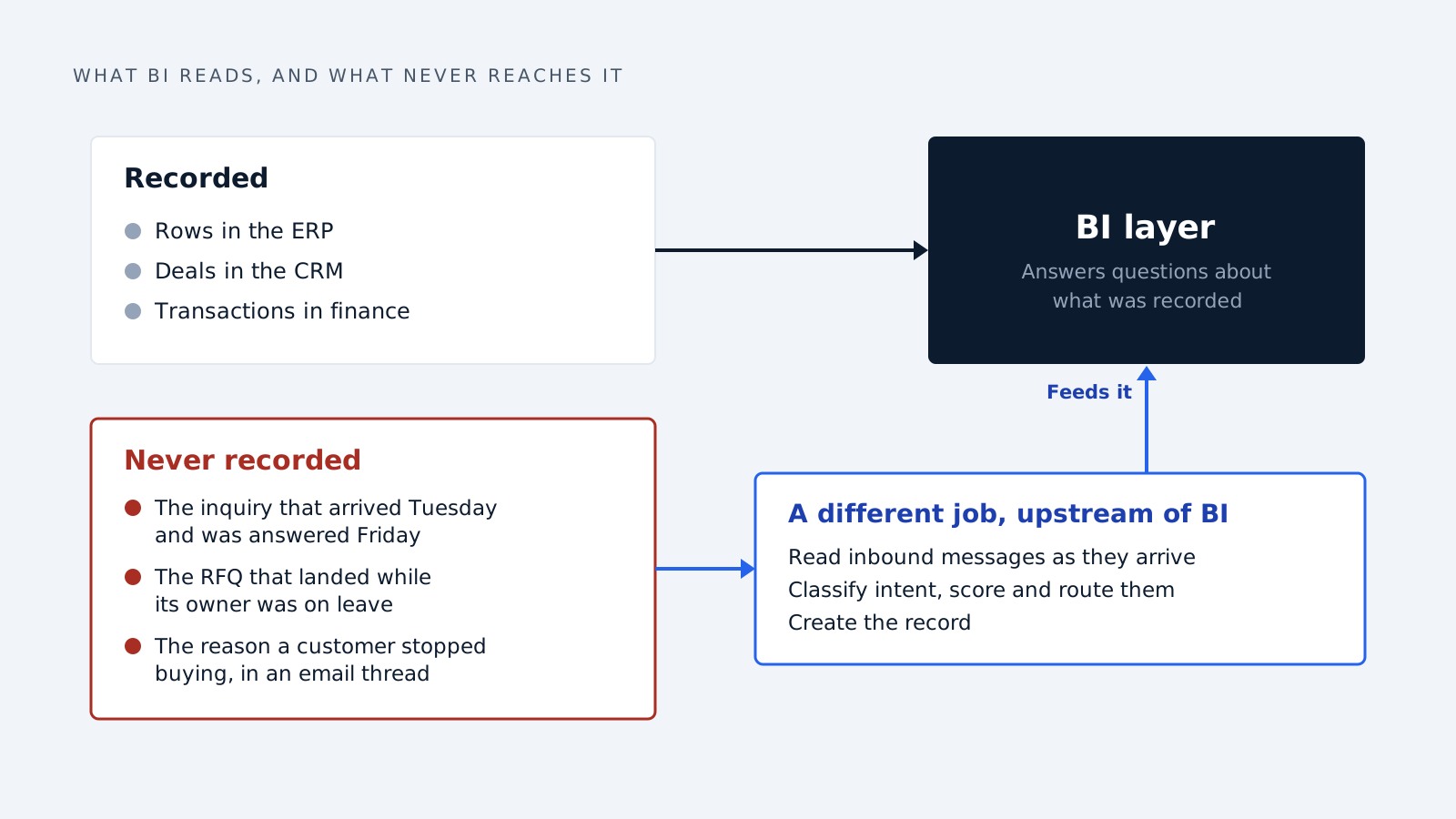
If your reporting problem is that you can’t see the numbers you have, BI as a service is the right purchase. If the numbers never got captured, no amount of BI will surface them. That fix belongs upstream.
Frequently asked questions
What does BI as a service mean? It means an outside provider operates your entire business intelligence function on a subscription: data integration, modeling, dashboards, reporting and ongoing maintenance. You pay a monthly fee and receive working reports, instead of buying tools and hiring analysts and engineers to run them yourself. The provider owns the pipeline and the platform.
Is BIaaS the same as cloud BI? No. Cloud BI describes where the software runs. BI as a service describes who operates it. A cloud Power BI or Tableau license is still software your team has to configure, model and maintain. With BIaaS, an external provider does that work and stays responsible for it.
How is BIaaS different from hiring a BI consultant? A consultant delivers a project and leaves. BIaaS is an ongoing service. They stay responsible for pipelines, reports and new requests. The difference matters, because many providers marketed as BIaaS are really selling project work on a retainer. Ask what happens in month thirteen.
How long does implementation take? Expect four to ten weeks to a first useful report for a typical mid-market scope. It runs longer when source data is messy, when systems lack clean APIs, or when teams disagree on definitions. The internal disagreement, not the technical work, is usually what extends the timeline.
What does BI as a service cost? Mid-market engagements generally start in the mid five figures annually and rise with the number of source systems. Enterprise engagements run into six figures. Pricing is usually a flat retainer, per-user, or consumption-based. Budget separately for your own team’s discovery time and source-system clean-up.
Who owns the data in a BIaaS arrangement? You should own all of it: the warehouse, the semantic models and the underlying data, yours to export in a standard format. Not every provider offers this by default, so confirm it in the contract before signing. Without it, switching providers later gets expensive and slow.
Is BIaaS suitable for small businesses? Rarely, unless the data sits across several systems. A small business running one clean source system is usually better served by that system’s native reporting plus a spreadsheet. The math starts working when joining up several sources is the hard part and nobody internal can do it.
Can we bring BI back in-house later? Yes, if you insisted on documented models and portable infrastructure at the start. Without those, the switching cost rises every year until the decision gets made for you. Keeping one internal person fluent in the models throughout the engagement is the cheapest way to avoid lock-in.
How we write, source and correct our articles:editorial policy.
Related reading
Best AI-Powered BI Tools in 2026: A Buyer's Breakdown
Power BI, ThoughtSpot, Tableau, Qlik and Zoho compared for 2026: what each AI layer does, what it really costs, and which team it fits.
AI Agent vs Chatbot: What's the Difference and Which One You Need
An AI agent acts on your systems. A chatbot answers questions. Here's the real difference, when each one is the right choice, and how to tell what a vendor is actually selling.
AI Agents vs Automation: What's the Difference and When Each One Wins
Automation follows rules you wrote. An AI agent makes judgement calls you couldn't write rules for. Here's the difference, where RPA fits, and which one your process needs.
Ready when you are
See it read your own sales mailbox
Twenty minutes, on a real mailbox, with no slides. Gmail, Google Workspace, Outlook and Microsoft 365.